
Why 2026 changes B2B invoicing
Manual invoicing is a compliance failure waiting to happen. In 2026, the convergence of aggressive regulatory mandates and agentic AI capabilities has shifted the baseline for B2B transactions. Businesses that rely on PDF attachments or manual data entry are now exposed to immediate penalties and operational friction.
The regulatory landscape has hardened significantly. Starting January 1, 2026, electronic invoicing becomes mandatory for all B2B transactions in Germany, eliminating the option for paper-based legacy workflows. Source: Seeburger
Simultaneously, India’s tax authorities have tightened reporting windows. From April 1, 2026, taxpayers with an aggregate annual turnover exceeding ₹10 crore must report e-invoices on the IRP portal within 30 days. This compressed timeline renders manual processing impossible for high-volume enterprises. Source: ClearTax
The market is growing at 14.2% annually as organizations rush to adopt compliant, automated systems ahead of these new e-invoicing mandates. Source: Gennai
Agentic AI now handles the complexity that rules like Germany’s ZUGFeRD or India’s e-Invoice require. These systems validate data against official standards in real-time, ensuring that every invoice meets the strict formatting and legal requirements of the target jurisdiction. The cost of inaction is delayed cash flow and regulatory non-compliance.
Choose the right B2B invoicing automation stack
Selecting a B2B invoicing automation platform requires balancing speed with strict compliance. The right stack reduces manual entry while ensuring your invoices meet regulatory standards like the 2026 e-invoicing mandates. You must evaluate whether an ERP-native solution or a specialized third-party platform better fits your operational complexity.
If your business already relies on a major ERP like SAP, adding an integrated module is often the most stable path. These solutions inherit existing master data and approval workflows, reducing the risk of data silos. However, they may lack the flexibility needed for complex cross-border tax calculations or rapid AI-driven anomaly detection.
Specialized platforms offer deeper automation features but require robust integration layers to connect with your core financial systems. When comparing options, focus on three criteria: native compliance support, cross-border capability, and AI-driven processing accuracy. The table below outlines the trade-offs between these two primary approaches.
| Feature | ERP-Native | Specialized Platform | Compliance Depth |
|---|---|---|---|
| Setup Speed | Moderate (uses existing data) | Fast (standalone deployment) | N/A |
| Cross-Border Tax Rules | Basic to Moderate | Advanced (global tax engines) | High |
| AI Anomaly Detection | Limited or Add-on | Core Feature | High |
| Data Silo Risk | Low | Medium (requires API integration) | N/A |
Map your invoice data flows
Mapping invoice data flows is the technical foundation of a compliant B2B invoicing system. It ensures that every data point from the initial purchase order to the final payment matches your ERP records and meets regulatory requirements. Without a clear map, automation becomes a source of error rather than efficiency.
Follow this sequence to integrate your automation tool with existing systems.

Use official API connectors provided by your ERP vendor (such as SAP, Oracle, or NetSuite) and your banking partner. Avoid generic email parsing for core transactional data. API connections allow the automation tool to pull purchase order (PO) data and push payment confirmations in real time. This creates a single source of truth for both internal finance teams and external auditors.
Create a strict mapping between the incoming invoice data and your internal ledger fields. Key fields to map include vendor ID, GL codes, tax amounts, and currency. If you operate globally, ensure your system can handle multi-currency conversions and local tax formats. A mismatch here is the most common cause of failed audits, as it breaks the audit trail required by tax authorities.
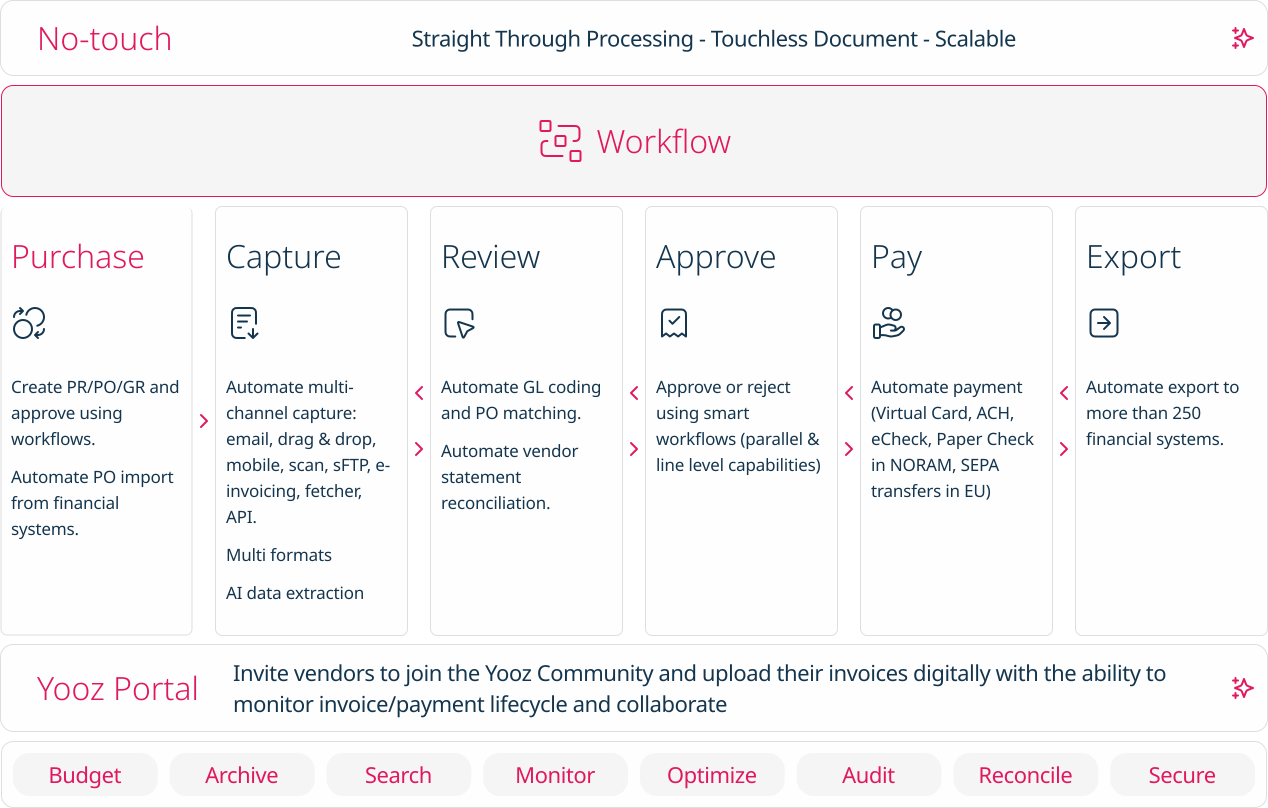
Set up rules that automatically flag discrepancies before they enter your system. Common rules include three-way matching (PO, receipt, and invoice) and duplicate detection. If an invoice does not match the expected data, route it to a "human-in-the-loop" queue. This ensures that automated approvals only happen for clean, compliant data, while exceptions are resolved quickly by your finance team.
Once these steps are complete, your data flow will be transparent and auditable. This setup is critical as new e-invoicing mandates take effect in 2026, requiring stricter adherence to digital reporting standards. By mapping these flows now, you ensure your B2B invoicing automation remains compliant and efficient.
Configure for global compliance
B2B invoicing automation is about navigating a fragmented web of regional mandates. In 2026, new e-invoicing requirements went live across Europe and parts of the Middle East, while India tightened its Goods and Services Tax Network (GSTN) reporting windows. To avoid penalties, your system must be configured to handle these varying legal structures before they trigger compliance failures.
Map regional mandates to your workflow
Start by identifying which regions your business transacts with and what specific document formats they require. For example, Europe largely relies on the PEPPOL network for standardized electronic exchange, while India mandates real-time reporting via an Invoice Registration Portal (IRP). Configure your invoicing software to detect the buyer’s location and automatically apply the correct format and routing protocol. This prevents the common error of sending a standard PDF to a jurisdiction that requires structured XML data.
Implement real-time validation rules
Many modern mandates, such as India’s 2026 GST updates, require invoices to be reported within a strict window—often 30 days or less from the date of issue. Configure your system to validate invoice data against local tax rules before it is sent. This includes checking for correct GSTIN formats, tax rate calculations, and mandatory fields. Automated validation catches errors early, ensuring that invoices are accepted by government portals rather than rejected, which can delay payments and incur fines.
Audit your configuration against official sources
Regulatory landscapes shift quickly. Relying on generic settings is risky. Instead, configure your system to pull updates from official sources. For instance, link your automation platform to the PEPPOL Authority for Europe or the GSTN portal for India to ensure your templates reflect the latest legal requirements. Regularly audit your configuration against these primary sources to maintain compliance. This proactive approach turns regulatory complexity into a manageable, automated process rather than a reactive crisis.
Validate and monitor DSO
Days Sales Outstanding (DSO) is the primary indicator of your order-to-cash (O2C) health. In a compliance-first automation setup, you must move beyond manual tracking and use AI analytics to monitor DSO in real time. This allows you to identify bottlenecks before they impact cash flow or violate regulatory deadlines.
Start by configuring your AI analytics dashboard to track DSO by customer, invoice type, and payment method. Look for patterns where specific segments consistently lag. For example, if invoices sent to a particular region show higher DSO, check whether e-invoicing mandates or local tax requirements are causing delays. The 2026 shift toward mandatory e-invoicing in many jurisdictions means that non-compliant invoices are the fastest way to inflate your DSO.
Use AI-driven anomaly detection to flag invoices that deviate from standard payment terms. If an invoice remains unpaid beyond the agreed net-30 or net-45 window, the system should automatically trigger a compliance check. This ensures that the delay isn't due to a missing tax code, incorrect PO number, or failed digital signature. By automating these validation steps, you reduce the administrative burden on your finance team and keep the O2C cycle moving.
Finally, establish a weekly review cadence. Compare your current DSO against your target benchmarks. If DSO is rising, drill down into the AI analytics to find the root cause. Is it a specific vendor? A particular payment method? Or a compliance gap in your e-invoicing workflow? Address these issues immediately to maintain liquidity and regulatory compliance.
-
Verify AI analytics dashboard is tracking DSO by customer and invoice type
-
Confirm anomaly detection rules are active for overdue invoices
-
Test e-invoicing compliance checks against 2026 regulatory requirements
-
Schedule weekly DSO review meetings with finance and compliance teams
-
Ensure automated reminders are triggered for invoices exceeding net-30 days
Common 2026 invoicing: what to check next
As e-invoicing mandates roll out globally, technical and compliance hurdles are shifting from optional upgrades to hard deadlines. Below are the specific answers to the most frequent questions regarding the 2026 regulatory landscape and implementation steps.
No comments yet. Be the first to share your thoughts!