
Start with the right platform
Choosing a B2B invoicing automation platform in 2026 requires looking past basic payment processing. The market has shifted toward AI-driven and agentic solutions that handle more than just sending PDFs. Modern systems extract data, match purchase orders, and route approvals without human intervention. This shift reduces the manual work that typically bottlenecks accounts receivable.
When evaluating options, focus on three core capabilities: AI accuracy, ERP integration depth, and cross-border support. AI features should go beyond simple text recognition to include predictive coding and anomaly detection. Integration must be bidirectional, ensuring that invoice data flows seamlessly into your existing ERP like NetSuite or SAP. Cross-border support is no longer optional for growing B2B companies; the platform must handle multi-currency formatting and local tax compliance automatically.
The table below compares leading platforms based on these critical 2026 criteria. Use this comparison to narrow your shortlist before requesting demos.
| Platform | AI & Agentic Capabilities | ERP Integration | Cross-Border Support |
|---|---|---|---|
| NetSuite | High (Predictive coding, anomaly detection) | Native (Oracle Cloud) | Advanced (Multi-currency, local tax) |
| SAP Invoice Payment Manager | Medium (OCR, basic validation) | Native (SAP S/4HANA) | Strong (Global SAP ecosystem) |
| LedgerUp | High (Full automation, agentic workflows) | Wide (API-first, 50+ ERPs) | Good (Multi-currency support) |
| Stripe Billing | Low (Basic fraud detection) | Medium (API, limited native ERPs) | Strong (Global payments network) |
Map your invoice approval workflow
Before automating, you must document the current state of your B2B invoicing automation process. Manual approval chains are often invisible to leadership until they cause a cash flow bottleneck. Mapping these steps reveals where invoices stall and why human intervention is currently required.
Start by listing every touchpoint an invoice takes from receipt to payment. This includes initial data entry, manager review, finance verification, and final disbursement. For each step, record the average time spent and the person responsible. This baseline is essential for measuring the impact of your new automated rules.
Gather your accounts payable team and map the existing workflow. Use a simple flowchart to trace a single invoice from vendor submission to bank transfer. Identify every handoff, email approval, and spreadsheet update. This visual map highlights the friction points that slow down your B2B invoicing automation efforts.
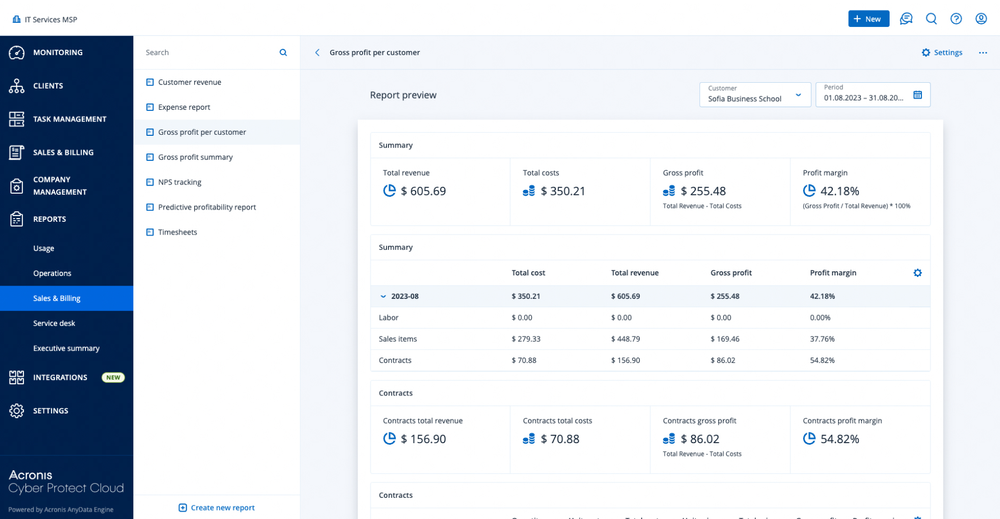
Analyze the map to find where invoices spend the most time. Look for steps that require manual data entry or repeated email chains. Determine which approvals are strictly necessary for compliance and which are just habit. These are the candidates for replacement with automated routing rules.
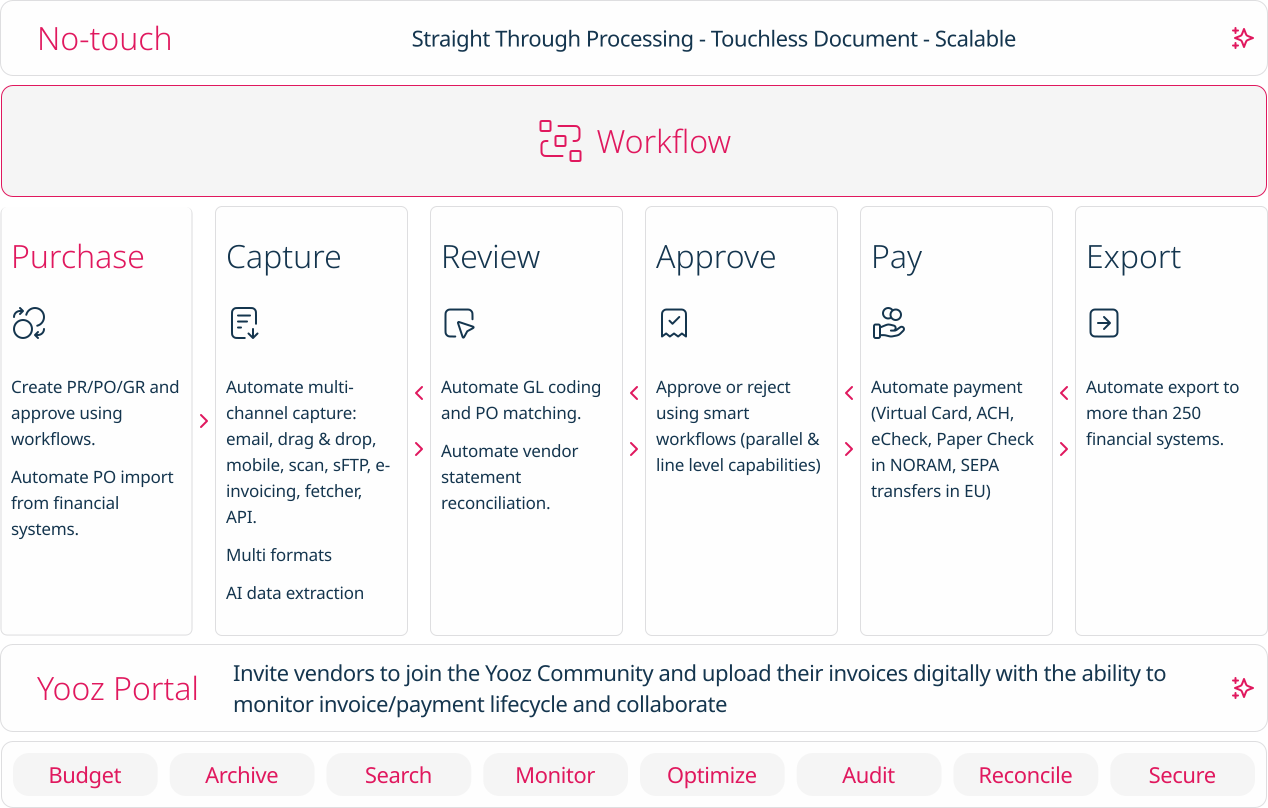
Set clear criteria for which invoices get auto-approved and which need human review. For example, invoices under $500 from trusted vendors could bypass manager approval. Higher amounts or new vendors might require finance team verification. These rules form the backbone of your automated B2B invoicing automation system.

Roll out the new workflow to a small team or a specific vendor category. Monitor how many invoices are processed correctly without human intervention. Check for errors in data extraction or incorrect routing. Adjust the rules based on real-world performance before a full-scale launch.
By mapping these steps, you transform a chaotic manual process into a predictable, automated system. This clarity ensures your B2B invoicing automation solution addresses actual operational needs rather than theoretical ones.
Integrate with your existing ERP
Connecting your new B2B invoicing automation tool to your legacy ERP system is the final step before going live. Without this integration, you risk creating a data silo where invoice details must be manually re-entered, defeating the purpose of automation. The goal is a bi-directional sync that keeps your general ledger accurate and your accounts receivable current without human intervention.
Map your data fields
Before writing any code or configuring connectors, audit your current ERP structure. Identify the specific fields used for customer IDs, line items, tax codes, and payment terms. Most modern invoicing platforms offer pre-built mappings for common ERPs like SAP, Oracle, or NetSuite, but legacy systems often require custom field mapping. Ensure that every unique identifier in your invoicing tool matches the primary key in your ERP database to prevent duplicate records or failed syncs.
Configure API endpoints and webhooks
For real-time data flow, configure the API endpoints provided by your invoicing platform. You will need to generate secure API keys and store them in your ERP’s environment variables, never in the code itself. Set up webhooks to trigger actions in your ERP when specific events occur in the invoicing tool, such as "invoice created" or "payment received." This ensures that your financial records update instantly rather than waiting for a scheduled batch job.
{
  "endpoint": "/api/v1/invoices",
  "method": "POST",
  "headers": {
    "Authorization": "Bearer <API_KEY>",
    "Content-Type": "application/json"
  },
  "payload": {
    "customer_id": "CUST-1023",
    "amount": 1500.00,
    "currency": "USD",
    "line_items": [
      {
        "description": "Consulting Services",
        "quantity": 10,
        "unit_price": 150.00
      }
    ]
  }
}
Test with sandbox data
Never connect the integration to your production database immediately. Use a sandbox or test environment within your ERP to run a series of test invoices. Verify that the data flows correctly in both directions: from the invoicing tool to the ERP for accounting, and from the ERP to the invoicing tool for customer validation. Check for common errors like mismatched currency formats or invalid date stamps.
Monitor and troubleshoot
Once the integration is live, monitor the first few weeks of transactions closely. Set up alerts for failed syncs or API errors. If you encounter issues, check the API logs in both systems to identify where the data breakdown occurred. Most providers offer dedicated support for ERP integrations, so keep your API documentation handy when troubleshooting. For complex legacy systems, consider using an integration platform as a service (iPaaS) to bridge gaps between older ERP versions and modern invoicing APIs.
Handle global e-invoicing mandates
By January 2026, the regulatory landscape for B2B invoicing shifts from optional digital adoption to strict compliance. The European Union and Germany are leading this charge, requiring businesses to exchange invoices in structured electronic formats. For companies operating across borders, failing to adapt your invoicing stack now means blocked payments and potential fines.
Germany’s January 2026 Mandate
Germany is implementing a mandatory B2B e-invoicing requirement effective January 1, 2026. This regulation affects all businesses exchanging invoices within the country, requiring formats like ZUGFeRD or XRechnung. Automation tools are no longer just for efficiency; they are the only practical way to generate these complex, standardized files at scale without manual intervention.
Note: Germany’s mandate requires structured data exchange, not just PDF attachments. Ensure your automation platform supports native XML or JSON-based formats like ZUGFeRD to remain compliant.
Navigating the EU Landscape
Beyond Germany, the EU’s e-invoicing directive pushes member states toward interoperable standards. While timelines vary by country, the trend is clear: paper and unstructured PDFs are being phased out for B2B transactions. Your automation strategy must prioritize format flexibility, allowing you to switch between national mandates (like France’s Chorus Pro or Italy’s SDI) as they roll out.
Automating for Compliance
Manual compliance is unsustainable. Implementing an automated invoicing system allows you to:
- Validate data in real-time: Check for missing fields or incorrect tax IDs before the invoice leaves your system.
- Format dynamically: Convert standard invoice data into the specific XML/JSON structure required by the recipient’s country.
- Track delivery: Ensure electronic invoices are received and acknowledged, creating an audit trail for tax authorities.
Start auditing your current invoicing workflows against the January 2026 German requirements. If your system cannot generate structured e-invoices automatically, upgrade your tools before the deadline hits.
Test the system with real invoices
Before you enable auto-send or full integration, run a validation cycle using actual vendor and customer data. This step catches formatting errors, tax calculation mismatches, and compliance gaps that sandbox tests often miss. Think of this as a dress rehearsal: you need to see the system perform under real-world conditions before going live.
Validation checklist
Run through these items with your finance and accounts payable teams. Each check ensures a specific part of the automation workflow functions correctly.
- Data mapping accuracy: Verify that line items, tax codes, and payment terms transfer correctly from source documents to the final invoice.
- Tax compliance: Confirm that regional tax rules (VAT, GST, sales tax) are applied correctly based on the client’s location.
- Duplicate detection: Ensure the system prevents duplicate invoices when uploading batches or integrating with ERP systems.
- Delivery confirmation: Check that emails or EDI transmissions are sent successfully and that delivery receipts are logged.
- Exception handling: Test how the system behaves when an invoice fails validation or encounters a missing field.
Simulate common scenarios
Don’t just test perfect data. Intentionally introduce errors to see how the system responds. For example, try submitting an invoice with an invalid customer ID or a missing PO number. The system should flag these issues clearly rather than silently failing or sending incorrect data.
This phase also helps you refine your approval workflows. If your automation requires manual approval for invoices over a certain threshold, test that routing to ensure the right people receive notifications and can approve or reject in a timely manner.
Monitor for the first month
After go-live, keep a close eye on the system for at least 30 days. Track metrics like invoice processing time, error rates, and payment cycle duration. Compare these against your baseline manual process to quantify the improvement.
If you notice recurring issues—such as delayed payments due to incorrect bank details or customer complaints about missing invoices—address them immediately. Small adjustments during this period can prevent larger problems down the line.
No comments yet. Be the first to share your thoughts!