

Get B2B invoice automation 2026 right
Before connecting any software, audit your current payment reality. B2B transactions rely on a mix of paper checks, ACH, wire transfers, and AP credit cards. Each method carries different friction points. If you plan to automate, you need to know which channels are still manual and where data quality breaks down. Fragmented systems and poor data hygiene remain the biggest hurdles to efficiency in 2026 Forrester.
Stable Invoice works best when it integrates with your existing ERP or accounting stack. The tool does not replace your ledger; it feeds it. Ensure your chart of accounts is clean. If your historical invoice data is messy, extraction accuracy will suffer regardless of the AI model used. Start with a subset of vendors who use digital invoicing to test the workflow before rolling it out company-wide.
Consider the cost structure carefully. Modern automation tools often price based on invoice volume. For a small business processing 250 invoices per month, best-in-class extraction and direct accounting integration can cost as little as $29 per month Gennai. This is significantly lower than the labor cost of manual entry. However, if you have complex, non-standard invoice formats, you may need a higher-tier plan with custom machine learning training.
Finally, verify that your payment gateway supports the B2B flows you need. Some platforms lean heavily toward B2C, while others, like Adyen, offer specialized tools for complex B2B payment flows and real-time payouts Adyen. Ensure your chosen solution can handle the specific reconciliation needs of your finance team, not just the initial capture of the invoice.
Step by step: Configure AI-driven invoice automation
This section walks through the technical setup for reducing B2B payment friction. The process moves from data ingestion to validation and final accounting integration. Following this sequence ensures your stable invoice data is accurate before funds move.
Begin by aggregating incoming invoices from all channels. Most B2B workflows still receive paper scans, PDFs via email, and EDI feeds. Configure your automation platform to ingest these files into a central staging area. Ensure the system supports OCR for handwritten notes or complex line items. This centralization prevents data silos that cause reconciliation errors later in the pipeline.
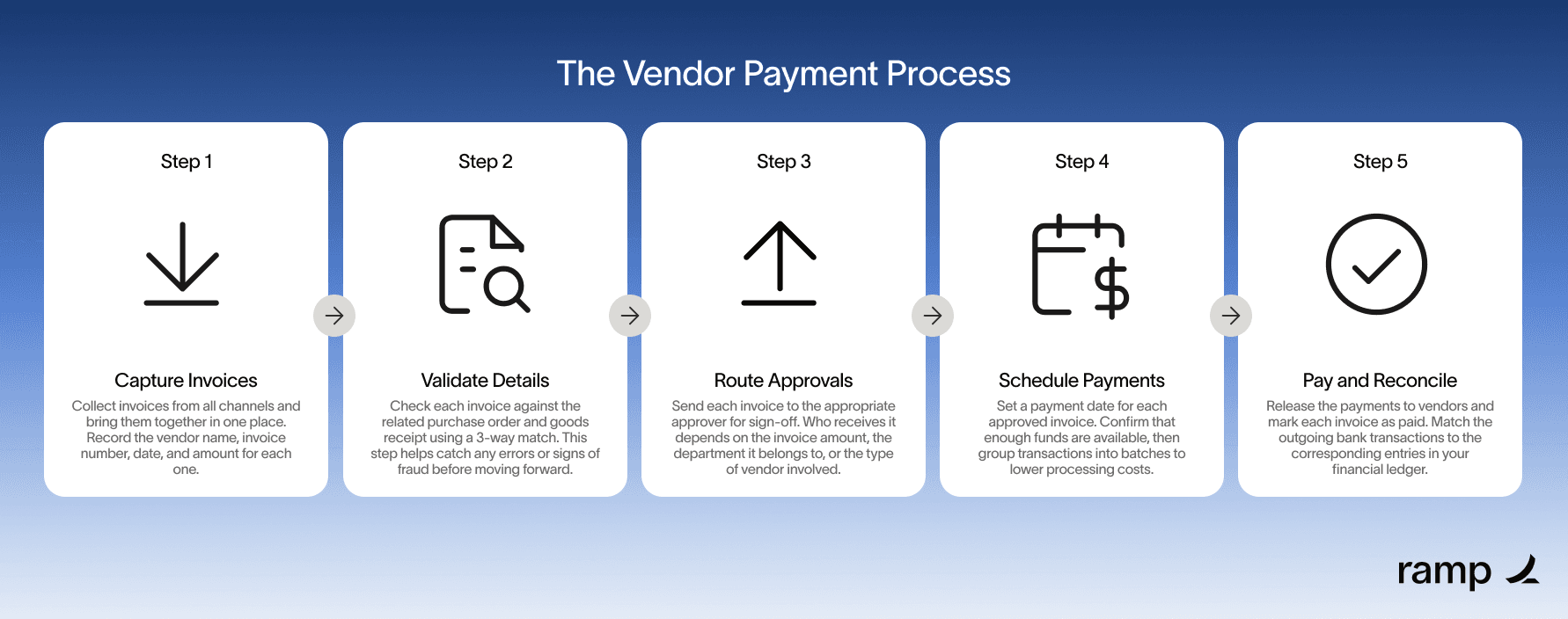
AI models require context to distinguish between vendor types. Map your top 20 vendors by spend volume first. Train the extraction engine on their specific layout templates, tax codes, and currency formats. For new vendors, set the confidence threshold high initially. Require human review for any invoice where the AI confidence score drops below 95%. This prevents bad data from entering your ledger.
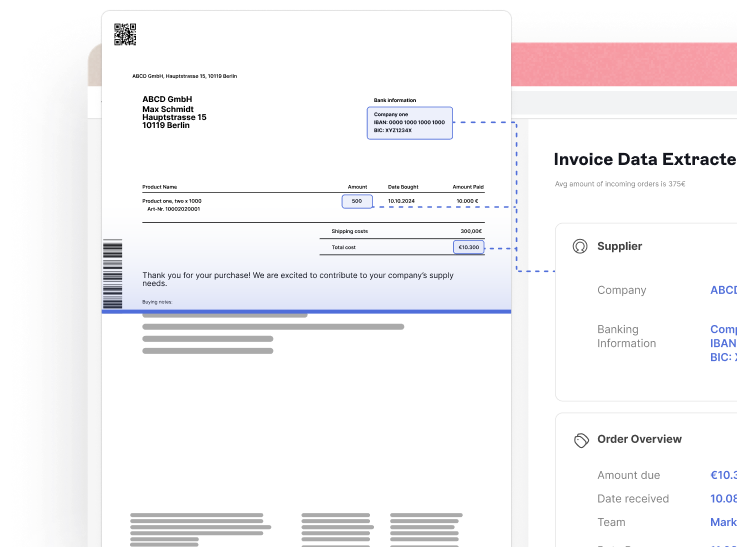
Link extracted invoice data to your existing purchase orders (POs). The system should automatically flag three-way mismatches: quantity differences, price variances, or unapproved line items. Configure tolerance levels for minor discrepancies, such as shipping cost fluctuations. Invoices that pass validation move to the approval queue; those that fail trigger an exception workflow for your AP team to resolve.
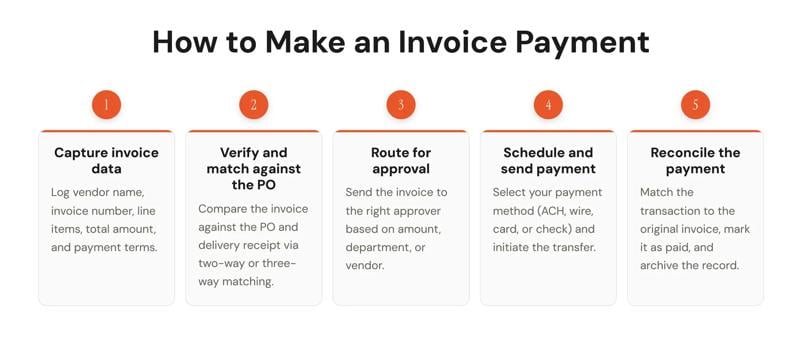
Push validated data directly into your ERP system to update accounts payable. Simultaneously, route the payment instruction to your preferred B2B payment method. While paper checks and wire transfers remain common, automating ACH or virtual card payments reduces friction. Ensure the integration supports real-time status updates so vendors see payment confirmation immediately upon execution.

Set up a dashboard to track extraction accuracy and cycle time. Review weekly reports for recurring errors or vendor-specific issues. Adjust your AI training data based on these findings to improve future performance. Regular audits ensure your automation continues to meet compliance standards and reduce manual workload effectively.
Fix common mistakes
Even with AI-driven invoice automation, poor outcomes usually stem from human error in setup rather than software failure. When invoice processing breaks down, it is rarely because the AI cannot read text; it is because the underlying data structure is messy or the validation rules are too loose. These three mistakes are the most frequent causes of payment friction and should be addressed first.
Ignoring data hygiene before automation
Automating a broken process only speeds up the errors. If your vendor master data contains duplicate entries, incorrect tax IDs, or mismatched addresses, the AI will confidently process incorrect information. Forrester notes that fragmented systems and poor data quality remain the primary hindrances to efficiency in 2026. Before enabling auto-posting, clean your vendor list. Ensure every supplier has a unique identifier and that tax forms are current. This step prevents the system from flagging valid invoices as duplicates or routing payments to the wrong bank account.
Over-relying on single-source extraction
Relying on one AI model for extraction creates a single point of failure. If the model encounters an unusual invoice format or a low-quality scan, it may hallucinate numbers or miss line items. Best-in-class automation uses multi-model verification. The system should run the invoice through two different extraction engines and compare the results. If the models disagree on a total or date, the invoice should be routed to a human reviewer automatically. This hybrid approach maintains high accuracy without slowing down the entire workflow.
Skipping the three-way match
The most common cause of overpayment is skipping the three-way match between the purchase order, the goods receipt, and the invoice. AI can automate this check, but only if the purchase order data is structured correctly. If the PO lacks line-item details, the AI cannot verify that the delivered goods match the billed items. Ensure your procurement system pushes detailed POs to the AP team. When the AI sees a mismatch between the PO quantity and the invoice quantity, it should block payment until the discrepancy is resolved.
B2b invoice automation 2026: what to check next
Before committing to a new AP workflow, finance teams need clarity on how automation interacts with existing payment rails and vendor requirements. The shift toward digital invoicing is driven by compliance mandates and the need to reduce manual touchpoints, but the underlying payment methods remain diverse.
Here are the most common practical questions about B2B invoice automation in 2026.
These answers address the immediate friction points in AP workflows. Understanding the landscape of payment methods and platform capabilities helps teams select tools that fit their specific volume and compliance needs.
No comments yet. Be the first to share your thoughts!